Find every old beat
on your drive
Years of projects spread over drives, backup folders and downloads. Muffin scans them all and puts every project and its renders in one searchable library, so you can hear an old beat without opening your DAW.
Free for 25 projects, no account needed · Windows 10 and 11
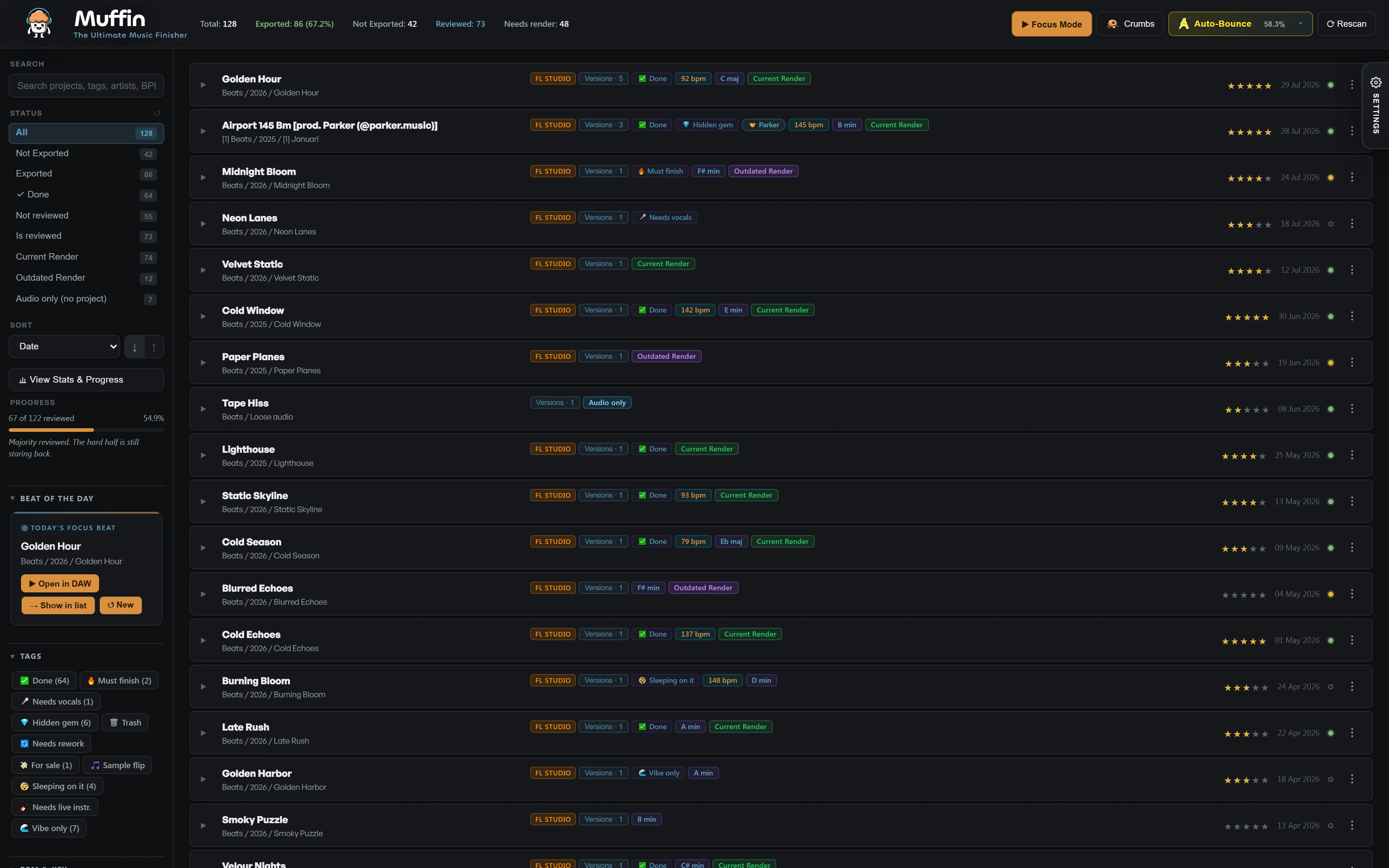
One list instead of
twenty folders
Every drive, one list
Muffin scans the drives you point it at and lists every project it finds, including the ones you forgot about.
Project and render together
Each project sits on one row with the audio you exported from it, instead of in two separate folders.
Search and filter
Find a beat by name, or filter on status, genre, key, BPM, year, rating and your own tags.
From scattered folders
to a library
Point Muffin at your drives
Muffin scans your folders and indexes your projects, renders and loose audio.
Search or filter
Narrow thousands of files down to the beats you are actually looking for.
Hear it from the list
Play any beat with a render straight from the library, without loading a project.
Finish the best ones
Rate as you listen and open only the projects worth finishing.
No render yet? For FL Studio projects, Auto-Bounce renders them in the background. Looking for one sample or melody instead of a whole beat? Crumbs shows the samples, MIDI patterns and channels inside your projects and where each file lives.
Questions
How do I find old FL Studio projects on my computer?
Point Muffin at your drives. It scans them and lists every project it finds in one library, next to the audio you exported from each project. Then search or filter the list instead of clicking through folders.
Can I hear a beat without opening the project?
Yes, if the project has a render. Muffin plays it straight from the list. For FL Studio projects without a render, Auto-Bounce renders them in the background.
Does Muffin move or rename my files?
No. Muffin does not change or move your original project files. Your folders stay exactly as they are.
Does it work with Ableton, Cubase or on Mac?
Muffin's library, playback and Mix Check work with FL Studio, Ableton Live, Cubase, Reaper and Reason projects. Auto-Bounce is for FL Studio only. Muffin is Windows only for now.
Is it free?
Muffin scans your whole drive for free and you work on 25 projects of your choice with every feature. No account, no card. A one-time license unlocks your whole catalog.
More guides: Batch render your FL Studio projects · Organize your beats

Your old beats are
still on that drive
Free on your first 25 projects. Scan tonight and hear what you forgot you made.
Free Download